electronics


I like to dabble in electronics, analog and digital. Various projects I have completed or working on are listed below.


FPGA fun


Field-programmable gate arrays (FPGAs) are interesting devices. They are (re)programmable logic on a chip, which means that pretty much any digital circuit you can think of can be implemented on a FPGA of sufficient size. They are widely used for prototyping, custom one-off circuits, and short production runs unlikely to benefit from the lower unit cost of an ASIC.

Most fascinating, potentially, is their use for computation. A dirty little secret about general-purpose CPUs like most anything Intel or AMD make is that they are actually rather slow for specific computing tasks. Graphics cards, for instance, can perform numerical computations at a far greater rate than a processor of the same era, as they are designed for the specific purpose of high computational throughput. CPUs, on the other hand, can handle more generic tasks but fail at extreme performance. FPGAs, with their virtually unlimited reconfigurability, are a good addition to a system containing task-specific chips and a general-purpose processor.

Along the lines of 'high-performance' computation, I have collaborated with Joshua Wise to write (in Verilog) logic to draw a Mandelbrot set in real-time on a VGA monitor. The Mandelbrot set is a connected set of points in the complex plane that depends on an infinite iterative process to determine whether each point is in the set. At each iteration, the original starting point is added to the (complex) square of the previous point. If this new point has a magnitude greater than 2, it must eventually 'escape' to infinity and is thus not part of the set. Points that are part of the set loop around in the circle of radius 2.

FPGAs, with their flip-flop registers and combinatorial logic, cannot easily implement such loops. In addition, were we to have each computation loop continuously through one computational unit, we would suffer a serious performance penalty. At 640x480 resolution and 60 frames per second, we need to output fully-computed pixels at 25MHz (including the overhead of vblank and hblank for the VGA signal). This is, at first glance, a difficult task. Each stage requires three multiplications to compute the square of the current value and many comparisons to determine if we are to 'bail out'. Anyone with experience in assembly can provide a rough estimate of how many instructions this takes: way too many.

The solution is to pipeline the computation. Each input goes into the processing pipeline and progresses from stage to stage each clock cycle, much as an assembly line produces a complex finished product at a prodigious rate. Each iteration stage consists of two halves: Each stage does its business in one clock cycle, and passes it along for the next. This way, while each input may take a while to be processed, inputs are accepted at the rate of one per clock cycle. This design on our FPGA can easily be clocked at 25MHz, and thus real-time output is no problem. Further logic drives the VGA output. This sort of computational chain is called a linear systolic array.

But what if we can actually clock this FPGA at twice the required speed, or 50MHz? We can double-pump the pipeline, feeding the beginning a result from the end every other cycle, while still achieving input and output at 25MHz. The advantage is that with minimal extra logic, we can effectively double the length of our pipeline and thus produce a higher-quality image. A simple toggle keeps track of whether we are feeding the result back into the pipeline or out to the display.

Better yet, what if we can clock it at 75MHz, triple the required speed? Yes, we can triple-pump the pipeline, feeding in each result yet again to the beginning of the pipeline. At this point we come across a significant design issue: keeping the pipeline synchronized with itself and with the output. With double-pumping this is simple: at each 50MHz rising edge, check if the 25MHz clock is high or low. Clocks sadly do not have three edges, nor do they have three states, so we must use a state machine to find and maintain proper synchronization.

This problem was eventually solved, and using all but a few percent of the FPGA's logic resources we have a circuit capable of displaying a Mandelbrot set in real time at 640x480 and 60FPS, calculated to a maximum of 27 iterations with 13-bit fixed-point arithmetic. This is a substantial level of computational power; if we consider each stage to be an 'operation' we already have 75MHz * 9 = 675 million operations per second. Given that each stage actually performs a good deal of work, integer performance can be rated in the billions of operations per second, which rivals recent CPUs.

Moreover, the FPGA used for the implementation is a low-end part that costs less than a tank of gasoline. High-end chips (which might cost more than the car you filled up) are capable of much higher speeds and contain many times the logic resources. Were this code rewritten to take advantage of it, performance would easily outstrip by orders of magnitude the fastest processors, by any reasonable measure.

This is the board we are using, a Digilent Nexys-2 with a 500k gate Xilinx Spartan-3E FPGA. We are not sure what '500k gate' means exactly, since there are about 9000 4-input single bit lookup tables to emulate logic and some large number of flip flops that act as registers. I purchased the 1200k gate variant of the same board; if you wish to buy your own I recommend the upgrade, as it provides about twice the logic resources for $20 more.
This is the default firmware. It responds to a mouse plugged into the PS/2 port; you can drag the Nexys2 logo around. It also does a number of other interesting things with the board.
Here is a photo of mandelfpga running. The edges are a bit ragged; this is probably the result of fixed-point arithmetic. Some useful capabilities include being able to scroll around the image, to change the zoom level (by powers of two), and to cycle the colors. Again, this is all done with digital logic on the FPGA.
A photo showing the zoom and scroll capabilities.
This is the second highest zoom level; as you can see we suffer from limited precision and iteration. As this is the 1200k gate variant, we added extra pipeline stages to bring the total number of iterations to 66.


wifi biquad


I made a biquad antenna for 2.4GHz 802.11 and adapted a wireless card to fit it. Pictures are below. It is made of a sheet of copper purchased from Home Depot (5" x 7" copper flashing cut to 120mm on a side), a small piece of brass tubing (also from Home Depot), some 10AWG magnet wire bent to form two diamonds, and a segment of RG316/U coaxial cable terminated with a female SMA connector (from the depths of my stockpiles). For those interested in making their own, there are detailed instructions and dimensions elsewhere on the web. Others suggest using a piece of copper-clad circuit board as the backplane. This is a good idea as the copper is thinner and easier to solder to, and the board is much stiffer than the copper sheet.

More interesting is the manner in which it is attached to the wireless card. Commercial cards use 'RP' or 'reverse polarity' coax connectors, meaning essentially that while they have the same size and basic connection method as the connectors they derive from, the pin and jack for the central conductor are flipped such that they are incompatible with the usual connectors. Availability of these connectors is limited, presumably to prevent such antics as connecting 'unapproved' antennas to wireless cards. I do not approve of these shenenigans, and any antenna you make is perfectly legal to use.

If you are lucky enough to have a Cardbus wireless card with an external connector already (almost all desktop cards, but very few portable ones) then please purchase a commercially made antenna or at least use the connector provided. It will likely save you a lot of headaches and be more efficient (impedance matched, etc.) as well.

I am almost certainly not the first to think of doing what I did, but I have found limited information about it elsewhere and decided that no reputable organization would describe a hack as ugly as this. Lu Laboratories is clearly no such organization and I have no misgivings about explaining this method.

Essentially, I attached my own SMA connector to a Cardbus wireless card. This is a risky endeavor and can potentially render your wireless card useless. I do not claim to know terribly much about RF theory and design, but in my experience this modification works fine.

To start, locate the antenna feeds on your wireless card. Sometimes on the feed there is already a small connector (likely RP-MMCX) hidden under the casing. Desolder this and you have an attachment point. If it is not there or is inconveniently located, carefully remove the solder mask layer (green stuff) on a trace and expose the copper below. I used a Dremel with a buffing wheel.

You will need a connector that mates with whatever connector is on your antenna. I used a female SMA connector on the coax pigtail, so I obtained a male SMA connector for the card. This happened to give a decent friction fit by clamping the pins around the plastic casing and the circuit board, and placed the center conductor and shield in a convenient location. I attached it to the card with hot-melt glue and connected a small segment of coax between the antenna feed and the connector, taking care to make the connections solid and not to short anything. The connections were delicate and thus protected with more hot glue. This proved too thick for the top cover, so a hole was cut for it.

Note that while some people claim a 14dB gain from the biquad, you will likely not see such an improvement in signal strength due to connector losses, imperfections in the antenna, and the questionable nature of the connector attachment. What you will see nonetheless is a substantial gain in signal quality (if you made it right) while retaining a large enough beam width to detect lots of APs near and far in a scan.

Of note is the fact that the wireless card gets really hot, especially when transmitting rapidly. I am not sure if this is fairly normal for the card or is as a result of an impedance mismatch with the biquad. The biquad is unlikely to be a good match, so the latter is probably the case.

Biquads are cooler than cantennas, so make one.

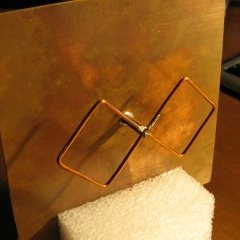
Here is the antenna itself. I cut a slot in a piece of foam to use as a temporary base for it. It is a pretty standard biquad design.
This is the top of the wireless card. As you can see, it is not a very clean hack.
Here is the bottom, showing a bit more of how the SMA connector attaches to the card.


miniPCI card hacking


or, why HP sucks


For those of you with certain HP laptops, you may have tried to replace the internal miniPCI wireless card with your own, only to find that the BIOS declares it an 'unauthorized device' and refuses to boot. This is irritating to people such as those who run Linux when the chipset on the existing card is not supported. HP would like to sell you a severely overpriced 'authorized' card, but it has the same unsupported chipset to boot. Or perhaps the existing wireless card is inferior for a number of reasons and you would like one that sucks less. In my case, I had a Broadcom-based miniPCI card originally, and wanted to replace it with an Atheros card that has much better support.

Various websites describe ways of hacking a BIOS image to accept the card and flashing it to the BIOS. After I bricked my laptop doing this and had it repaired under warranty, I decided that a hardware hack might be a safer idea. After the laptop came back, some ideas for how to bypass the BIOS check were developed.

The idea is to make the card appear nonexistent to the BIOS, but enable it as soon as it loads GRUB. The PCI specification describes a pin called IDSEL, which does almost exactly that. By controlling the input to the IDSEL pin, we can control whether the card reports its existence and thus whether the BIOS sees it upon boot.

As a side note, this and the BIOS reflash technique have become mostly irrelevant, as Linux now has good support for all common wireless chipsets. In addition, the default wireless card is usually pretty good anyway; my replacement card performed more poorly than the original.

IDSEL is pin 48 of the card. This pin was located and covered with a tiny strip of tape, which caused the card to be undetected by both the BIOS and Linux. Then the trace to the pin itself was cut, yielding the same result. Adding a normally-closed pushbutton switch between the trace on the card and the contact allowed control over the signal.

The laptop was booted with the switch depressed, causing the BIOS to ignore the card and boot normally. Once GRUB loaded, the button was released and Linux recognized the card upon boot. Success.

This is, like the biquad's wireless card, an ugly and potentially risky hack. The switch would have to stick out of the laptop case were this to be used for normal operation. The alternative we devised was to install a small board with a 555 timer chip driven as a delay, to activate the IDSEL pin after a certain amount of time. This was not implemented, and we realized it would take some effort and creativity to get it to fit. Although this hack works, I suggest BIOS modification if one wishes to install an 'unsupported' wireless card, as this method seems impractical.

The switch and the Atheros wireless card.
The (hot-glue-protected) solder connections between the wires to the switch and the card.
The card, sitting in my laptop. The keyboard had to be removed in order for the switch to be accessible. The switch is connected by the two barely-noticeable orange wires, not the big black and white antenna connections.
Detail of the card in my laptop.


H-bridge


A general-purpose H-bridge (full bridge, push-pull) driver is a good thing to have around. They are of particular interest for high-voltage hobbyists, as H-bridges are used to drive SSTCs, flybacks, and high voltage inverters. Here, Joshua Wise and I try to build a simple, scalable, and robust H-bridge out of (hopefully) readily available components. This project is in progress, so updates will be posted as they occur.

One requirement early on was no gate drive transformers. While GDTs have their merits, such as simplicity and built-in isolation, they tend to have problems with driving bigger FETs. High-side drivers with a bootstrapped supply work quite well as a replacement, with the substantial benefit of having the driver directly connected to the gate. Eliminating the magnetics in the gate drive helps decrease switching times. Another motivation was that no cores were available at the time.

For an oscillator, we rigged up a 555 circuit to generate a 15kHz signal. The low frequency was chosen mostly because it was easy to design for that frequency, and for a proof of concept, it should be fine. Although they are not a stable timing source and do not allow easy feedback, 555s are cheap and widely available. We assume that passives can be obtained fairly easily as well.

The gate drivers used are UCC27321 and UCC27322 inverting and non-inverting drivers, respectively, from Texas Instruments. They can pump out 9A peak current to quickly switch MOSFETs and IGBTs with high gate capacitance. These can be sampled from TI or purchased for a low cost. These drivers have repeatedly been proven to perform well in driving relatively large transistors.

Since the source potential of the 'top' two MOSFETs in an H-bridge quickly varies between near V+ and near ground, powering the gate drivers is interesting. The obvious (and most robust) way is to simply have an isolated supply for each gate, with the source as a reference 'ground'. The other common way is to use what is known as the 'bootstrap' method, which uses a non-isolated supply that charges a capacitor through a diode when the source potential is near ground. When the potential floats up to near VCC, the diode prevents the capacitor from discharging and the capacitor retains enough charge to drive the gate. This essentially creates a floating supply when there is none.

Fast diodes and capacitors with low series resistance are generally needed for this. We used fast signal diodes from Radio Shack; the gate drivers pull very little average current and these diodes can handle 300mA continuous. For a capacitor, we used a 100uF electrolytic along with a 1uF ceramic bypass cap to keep overall capacitance high while still being able to deliver a current pulse when needed.

However, the signal also needs to be isolated. The lower two FETs do not need isolation, but the top two need a level-shifted input. We employ a capacitor between the signal output and the gate driver's input. To keep the potential on the high side correct, we make a voltage divider from large resistors that ensures the average voltage is halfway between ground and Vdd. This will not work correctly for duty cycles that are not 50%; a proposed solution is to keep the average voltage at ground and allow the signal input to drop below ground. Originally we chose to use optoisolators for this purpose, but proved to be too slow even for 15kHz.

Probing the MOSFET gates showed that the risetime was on the order of 10ns, which is as fast as our 100MHz scope will go. The waveforms looked very clean, albeit with some overshoot on the high side. Testing pairs of FETs showed that they were properly phased, and everything else looked fine. Plugging in the H-bridge to power produced a contrary result. The overcurrent protection on the supply kicked in and shut it off. Further investigation and testing failed to uncover anything about what was wrong and succeeded in blowing up the 555 and a couple of UCCs. Progress has been halted due to this.

We have instead decided to use a TL494 chip, which is at heart a PWM chip designed to drive single-ended and push-pull switching topologies. It is a versatile IC with dead time control and feedback, enabling relatively simple switching power supplies to be built around one. We are ignoring most of the functions of the chip and simply using it as a variable dead time push-pull signal generator. With a minimum of 3% dead time on this chip, we should be able to avoid any shoot-through that may have occurred with the 555. TL494s are slightly less common than 555s but can be purchased from most electronic parts distributors. The extra features will come in useful should anyone wish to use PWM to control power or feedback to drive a resonant circuit.